---
title: How to Interpret TikTok Data
description: "Trendalytics TikTok Data Interpretation: A guide on utilizing TikTok data within the TrendPulse platform to analyze trend performance (growth or decline) across views and posts. It details specific metrics available on the Trend Discovery Page (Interest Over Time, Overall Total, Increase, Related Videos), the Table View Page (Overall Views, Period Total, Velocity), and the Trend Detail Page. The guide also outlines practical applications, such as identifying top TikTok trends, social/marketing callouts, understanding customer demographics from related videos, and exporting data for analysis."
---
[Skip to content](https://support.trendalytics.co/en/trendalytics-university/how-to-interpret-tiktok-data#main-content)
English
Show submenu for translations

- [Technology](https://trendalytics.co/technology)
- [Editorial](https://blog.trendalytics.co/)
- [News](https://trendalytics.co/news)
- [Login](https://app.trendalytics.co/)
Open main navigation
Close main navigation
- [Technology](https://trendalytics.co/technology)
- [Editorial](https://blog.trendalytics.co/)
- [News](https://trendalytics.co/news)
- [Login](https://app.trendalytics.co/)
- English
Show submenu for translations
How can we help you?
- There are no suggestions because the search field is empty.
1. [Trendalytics University](https://support.trendalytics.co/en/trendalytics-university?hsLang=en)
2. [TrendPulse](https://support.trendalytics.co/en/trendalytics-university/trendpulse?hsLang=en)
3. [TrendPulse - How To](https://support.trendalytics.co/en/trendalytics-university/trendpulse?hsLang=en#trendpulse-how-to)
# How to Interpret TikTok Data
## Use TikTok data to analyze how a trend is performing and understand how fast it is growing or declining across views and posts.
In the Trend Table, refer to the **TikTok** section to find data for *Views* and *Posts* next to each trend.
**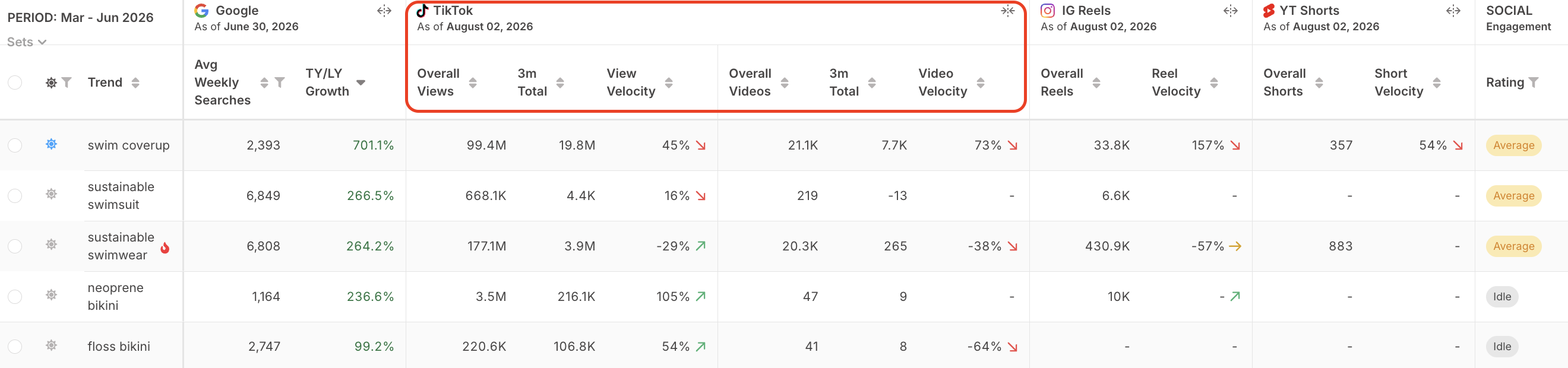**
- **Overall Views:** the total amount of views for the trend
- **View Period Total (1M, 3M, 6M)**: the total amount of views during the selected period for the trend (the *period is based on the time period you have selected at the top in the Smoothing Window*)
- **View Velocity:** comparing the current period total views to the previous periods views to measure the increase or decrease of the trend’s growth (the arrow next to velocity is adding more context to the recent change in view velocity compared to *last week* - is the trend’s increasing growth rate beginning to slow down?)
---
- **Overall Posts:** the total amount of posts for the trend
- **Post Period Total (1M, 3M, 6M)**: the total amount of posts during the selected period for the trend (the *period is based on the time period you have selected at the top in the Smoothing Window*)
- **Post Velocity**: comparing the current period total posts to the previous periods posts to measure the increase or decrease of the trend’s post count (the arrow next to velocity is adding more context to the recent change in post velocity compared to *last week* - is the trend’s post count growth rate beginning to increase or slow down?)
**TL Tip**: To spot the trends with the strongest recent growth, set the *Smoothing Window* to **1M** and sort *View* *Velocity* from highest to lowest. This surfaces the trends with the biggest month-over-month increase in views.
.gif?width=670&height=377&name=Untitled%20design%20(3).gif)
Click into any trend to open the Trend Detail Page and explore its TikTok Interest in more detail. There, you can track how the trend’s TikTok views and posts change week over week and compare the average weekly increase in views versus posts.

Scroll to **TikTok** **Stream** in the *Stream* *Media* section to explore the related videos TikTok has identified as top trending content for that trend.

**How and When to Use this Tool**
1. **What the top trends are from a TikTok perspective:** Decide if you would like to see the trends over the last month or 3 months. Select the trend category filters you would like to use to analyze further. Then click on View Velocity to sort high to low. For further manipulation, export the trends to excel to filter on posts as well.
2. **Identify which trends to call out for social/marketing:** Utilize the data to identify which trends to call out from a Marketing/Site Merch and Social perspective. Create a custom Trend Set to group trends together around a theme to see which one is gaining the most traction on TikTok or other social platforms.
3. **Identify who the customer demographic is:** Utilize the top trending videos flagged by TikTok, under TikTok Stream, to better understand who is talking about this trend (Gen Z, Mommy bloggers, everyone) and how they are styling, talking about this trend.
4. **[Export to Excel](https://www.loom.com/share/04f6af425a5b425a986eb80d90f26f77)for easier use:** Download your trend selections from the Trend Table to Excel to add more filters to the TikTok data metrics.
For assistance, reach out to your Customer Success Manager with any questions!
- [TrendPulse](https://support.trendalytics.co/en/trendalytics-university/trendpulse?hsLang=en#main-content)
- [TrendPulse 101](https://support.trendalytics.co/en/trendalytics-university/trendpulse?hsLang=en#trendpulse-101)
- [TrendPulse - How To](https://support.trendalytics.co/en/trendalytics-university/trendpulse?hsLang=en#trendpulse-how-to)
- [MarketPulse](https://support.trendalytics.co/en/trendalytics-university/marketpulse?hsLang=en)
- [BrandPulse](https://support.trendalytics.co/en/trendalytics-university/brandpulse?hsLang=en)
- [Editorial](https://support.trendalytics.co/en/trendalytics-university/editorial?hsLang=en)
- [Reports](https://support.trendalytics.co/en/trendalytics-university/reports?hsLang=en)
[](http://trendalytics.co?hsLang=en)
[mailto:email@email.com](mailto:email@email.com)
Copyright © 2026, Trendalytics