---
title: How To Identify SEO Opportunities?
description: This article provides instructions on how to leverage the Trend Category and Table View filters within TrendPulse to narrow down trend selections, identify valuable trends for SEO call-outs, and determine optimal strategies for trend optimization within the market.
---
[Skip to content](https://support.trendalytics.co/en/trendalytics-university/how-to-identify-seo-opportunities#main-content)
English
Show submenu for translations

- [Technology](https://trendalytics.co/technology)
- [Editorial](https://blog.trendalytics.co/)
- [News](https://trendalytics.co/news)
- [Login](https://app.trendalytics.co/)
Open main navigation
Close main navigation
- [Technology](https://trendalytics.co/technology)
- [Editorial](https://blog.trendalytics.co/)
- [News](https://trendalytics.co/news)
- [Login](https://app.trendalytics.co/)
- English
Show submenu for translations
How can we help you?
- There are no suggestions because the search field is empty.
1. [Trendalytics University](https://support.trendalytics.co/en/trendalytics-university?hsLang=en)
2. [TrendPulse](https://support.trendalytics.co/en/trendalytics-university/trendpulse?hsLang=en)
3. [TrendPulse - How To](https://support.trendalytics.co/en/trendalytics-university/trendpulse?hsLang=en#trendpulse-how-to)
# How To Identify SEO Opportunities?
## Utilize the trend category and table view filters to narrow down your selection to begin to identify which trends you can call out from an SEO perspective and how to optimize trends in the market.
Use the **Trend** **Category** filter to narrow your view from broader categories, such as Apparel, into subcategories like Denim or Pants so you can begin analyzing trend activity within bottoms.
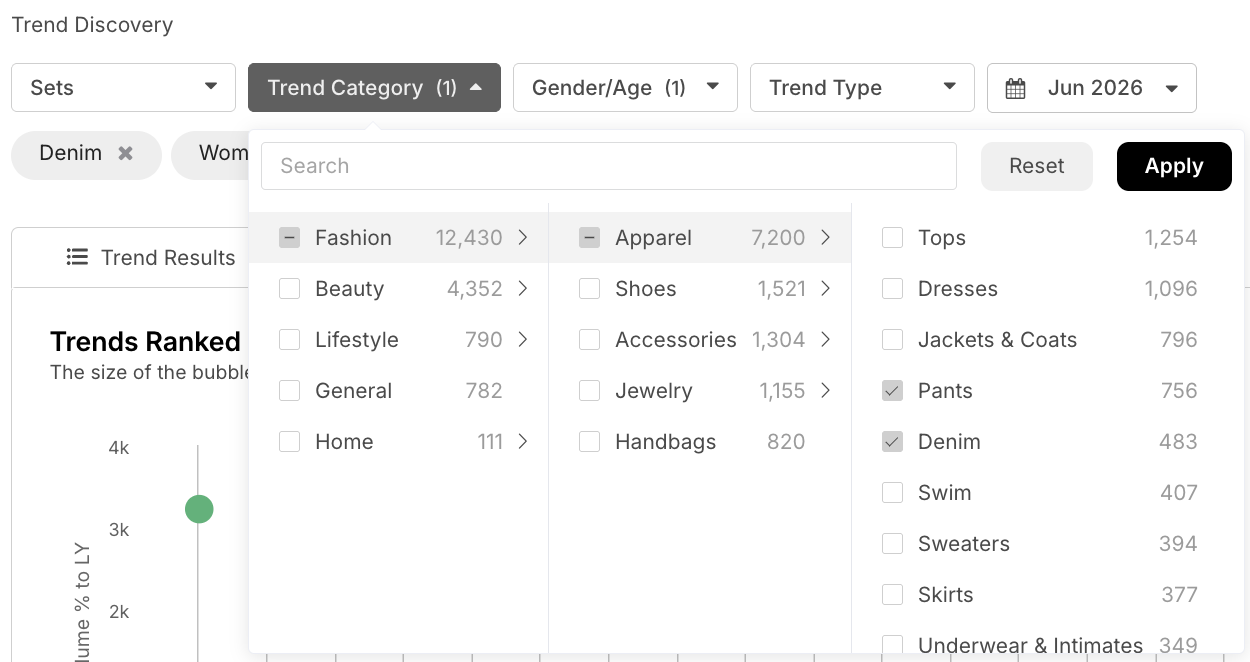
Next, scroll past the bubble chart to the table below. From there, either collapse the headers or scroll all the way to the right until you reach the **Market** **Index** column.
.gif?width=670&height=268&name=Knowledge%20Base%20GIF%20(7).gif)
To analyze market metrics and uncover opportunities, use the filters under **Market Index** — **Flags** and **Discount**. These filters help you identify trends that are New to Market, Top Market Movers, or showing high or low discount levels.

Under the *Flags* dropdown, use the **New** **to** **Market** filter to identify trends that retailers have recently added to their assortment. While some may reflect seasonal product launches, others may point to emerging trends that retailers are beginning to invest in.
Use the **Top Market Mover** filter to identify trends that may be emerging as best sellers in the market. These trends are flagged based on high stockout percentages among new products. While we do not have direct sales or inventory data, stockout percentage serves as a useful proxy for demand by comparing how many SKUs are sold out versus still available across the e-commerce sites we track.

- **New to Market** - Indicates trends that have significant newness online, including both seasonal additions and emerging trend adoption.
- **Top Market Mover** - Highlights potential best-sellers in the market based on high stockout percentages among new products.
Under the **Discount** dropdown, apply a discount-level filter or select *Low SKUs* to identify potential white space opportunities. A Low SKUs flag indicates that relatively few products across the e-commerce sites we track are calling out that specific trend. If search or social data shows the trend is gaining momentum, this may signal a strong opportunity to capitalize on it from an SEO perspective.

- **Discount** - See whether a trend is at a relatively Low, Moderate, High, or Extreme discount level, or whether it has a low number of products currently in the market.
To better understand how to identify SEO opportunities below - [check out our video](https://www.loom.com/share/2bcb1ba0b3bb4eda9f3e53c9acd48ffb) covering step by step areas to assist you with identifying which trends to capitalize on.

**How and When to Use this Tool**
1. **Understand How the Market and Consumer May Call the Same Product Differently:** When using the **New to Market** filter, remember that a single trend may also appear under several different names, all of which are worth exploring. For example, if Cheetah Top is flagged as New to Market, also review related terms such as Cheetah Blouse, Cheetah Sweater, Leopard Shirt, and Leopard Button Down to make sure you are capturing the full scope of the trend. You can use the [**Trend Sets**](https://www.loom.com/share/e43bc5955914421a8a597cdd2f80f43d)tool to group and analyze multiple related trends around a broader theme. This makes it easier to compare how people are searching for the trend, how it is being discussed on social media, and how the market is naming it. Understanding the difference between consumer language and competitor language can help you adjust your strategy accordingly.
2. **Identify Gaps in your Competitors Assortment:** When using the New to Market or Top Market Mover filter to identify new trends retailers are chasing into, click into the trend to identify which retailers are the ones investing into these trends and see if your competitors are missing the opportunity here.
For assistance, reach out to your Customer Success Manager with any questions!
- [TrendPulse](https://support.trendalytics.co/en/trendalytics-university/trendpulse?hsLang=en#main-content)
- [TrendPulse 101](https://support.trendalytics.co/en/trendalytics-university/trendpulse?hsLang=en#trendpulse-101)
- [TrendPulse - How To](https://support.trendalytics.co/en/trendalytics-university/trendpulse?hsLang=en#trendpulse-how-to)
- [MarketPulse](https://support.trendalytics.co/en/trendalytics-university/marketpulse?hsLang=en)
- [BrandPulse](https://support.trendalytics.co/en/trendalytics-university/brandpulse?hsLang=en)
- [Editorial](https://support.trendalytics.co/en/trendalytics-university/editorial?hsLang=en)
- [Reports](https://support.trendalytics.co/en/trendalytics-university/reports?hsLang=en)
[](http://trendalytics.co?hsLang=en)
[mailto:email@email.com](mailto:email@email.com)
Copyright © 2026, Trendalytics